What it is
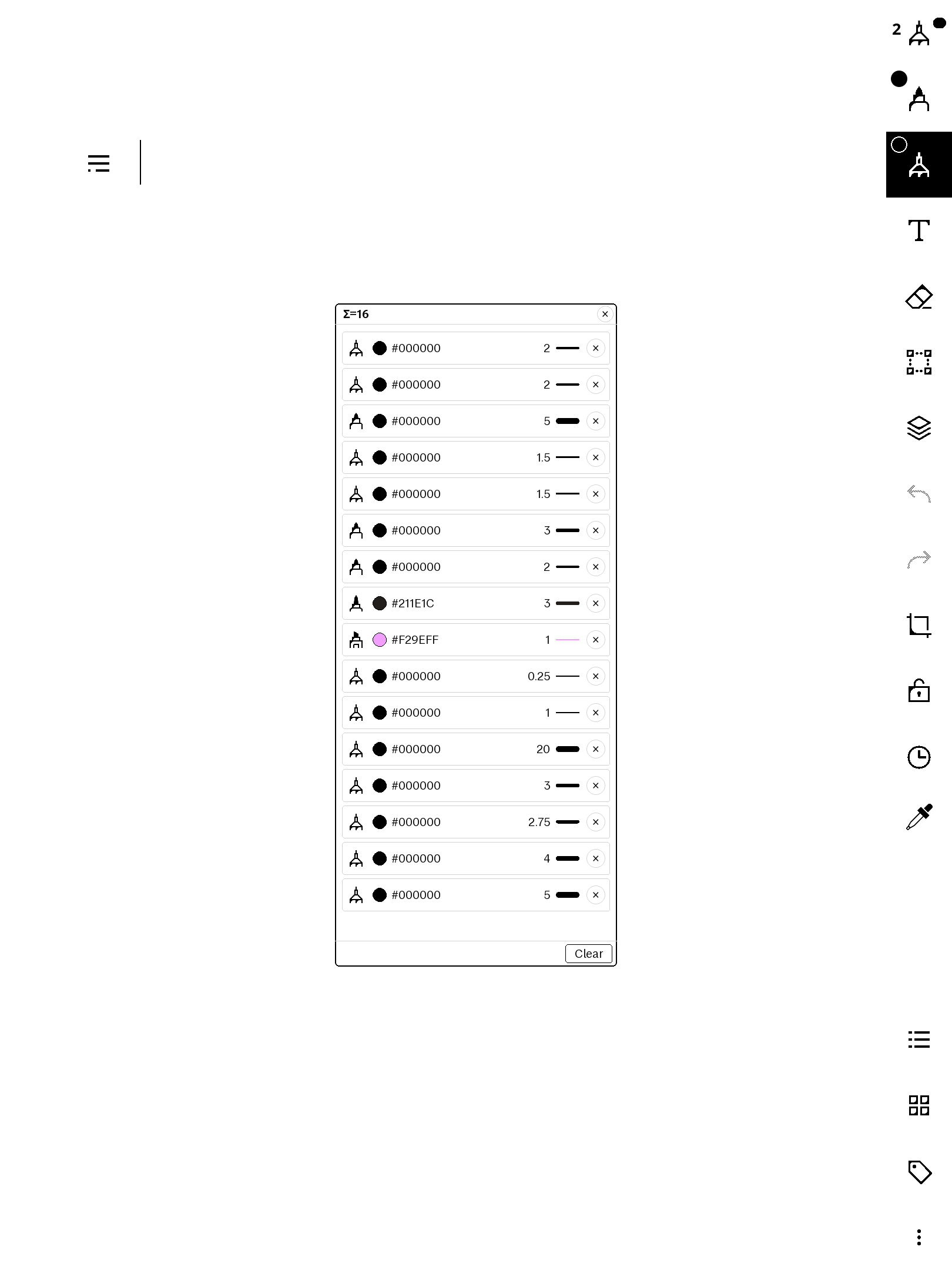
The Paper Pro toolbar gives you two pen slots — but a page of real work uses far more: a fine black for text, a red for corrections, a highlighter, a thick blue for diagrams. penHistory adds a clock button to the writing toolbar that opens a floating panel listing every distinct pen state you have used in the current notebook, newest first. Tap a row to load it back. History is kept per document, so one notebook's palette never mixes with another's.
Features
- Automatic capture — every time you change tool, colour, or thickness, the new pen state is recorded (up to 16 per document, de-duplicated so a pen never appears twice).
- One-tap re-apply — tap a row to load that pen into your secondary slot; the pen it displaces moves to the top of the list.
- Quick A/B — a short tap of the clock button toggles straight back to your previous pen, for fast switching between two.
- Readable rows — each shows the tool glyph, a colour swatch, the ARGB hex
code, the thickness number, and a stroke-width bar, plus a per-row
×to delete just that entry. - Header + footer — a live
Σ=Ncount and×close in the header; a two-tap-to-confirmClearin the footer that wipes only the current document's history. - Draggable — grab the header to move the panel; it re-centres on restart.
- Self-contained + private — a plaintext qmldiff patch, no network, no
telemetry. History lives in one JSON file under
/home/root/; nothing leaves the device. - Co-tenant safe — every QML id it injects is namespaced (
phx*) so it won't collide with other installed qmd tweaks.
Requirements
- reMarkable Paper Pro, firmware 3.26.0.68. Built for firmware 3.26.0.68 exactly — qmldiff patches key off the firmware's QML, so other versions are untested.
- xovi + the qt-resource-rebuilder extension (free; links in the README).
- No other paid item required.
Install
Copy one file to the device, restart xochitl the xovi-safe way (exact commands in the README), and the clock button appears in the writing toolbar. Uninstall = delete the file, restart, and optionally remove the history file. No system files are modified on disk.
Honest caveats
- This product modifies the on-device user interface at runtime. It contains no reMarkable software; changes are applied to files already present on your device and are fully removed by uninstalling.
- History is applied to the secondary pen slot — the device exposes only two live pen objects to the UI, so a tapped row loads there rather than into an arbitrary new slot.
- Colours for the fixed palette swatches are resolved via a lookup table calibrated for firmware 3.26.0.68; custom colours (from a hex/ARGB picker such as our freeColour) carry their own code and always render exactly.
- This patches the system UI via qmldiff (that's what makes the toolbar button possible) — unlike our AppLoad apps. The README includes the one-line SSH recovery should any qmd on your device ever misbehave: delete the file, restart. Nothing persistent is touched.
- qmldiff patches are firmware-sensitive; tested on 3.26.0.68, updates best-effort after firmware releases.