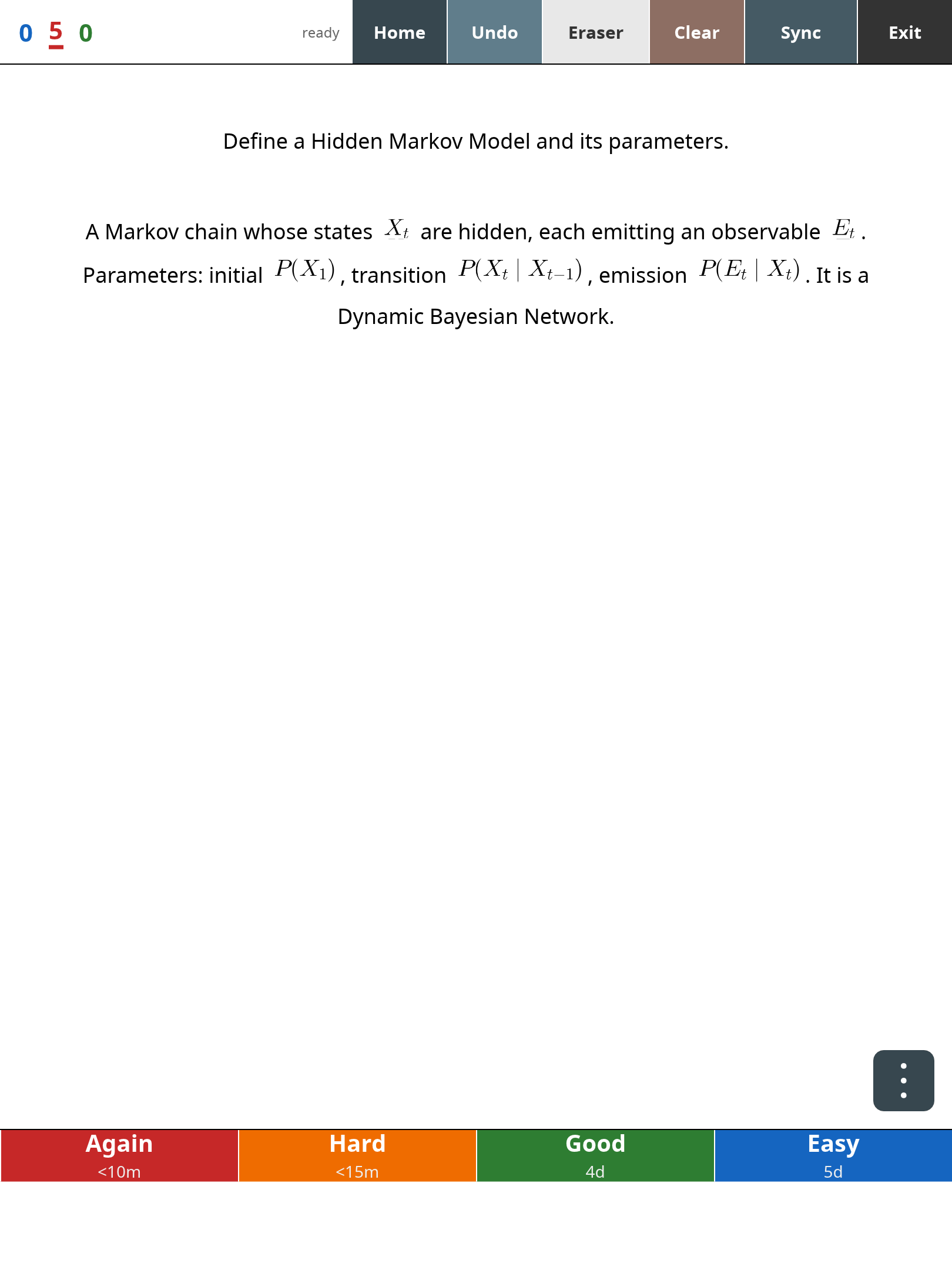
What it is
Anki on the reMarkable Paper Pro — the real thing, not a viewer. It runs Anki's actual Rust backend
(rslib): a true .anki2 collection, the FSRS scheduler with per-grade interval
previews, and genuine AnkiWeb sync (incremental, with automatic full-download
recovery; media included). Cards render with their own HTML/CSS templates and
images, and LaTeX math renders on-device.
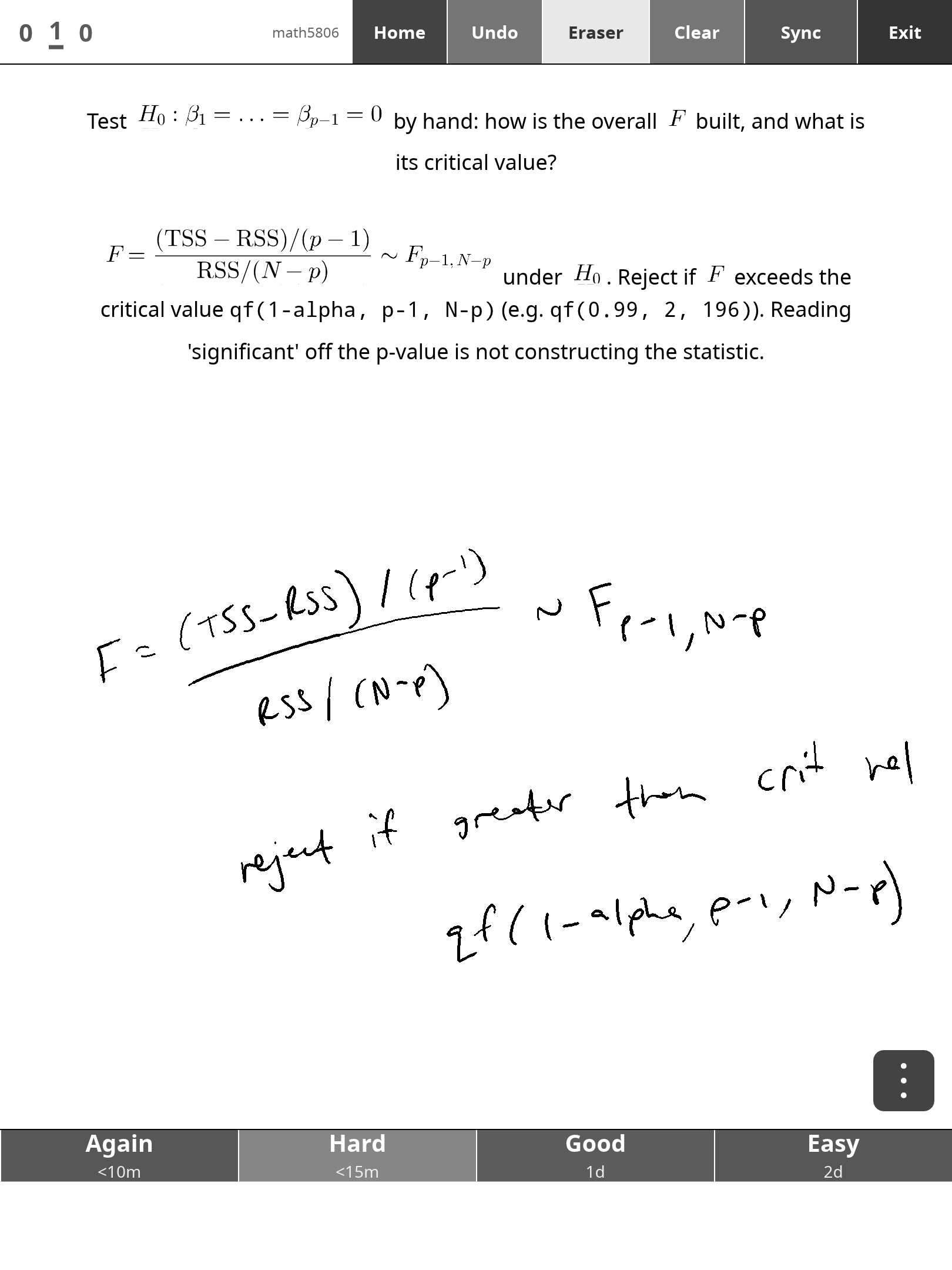
The part no other client has: an AnkiDroid-style pen whiteboard over every card. Work the answer by hand with the marker — low-latency inking tuned for the colour e-ink panel — then reveal and compare before you grade.
About sync
ankimarkable speaks Anki's own sync protocol. It works with AnkiWeb today, but Ankitects' terms reserve AnkiWeb sync for the official clients — third-party access is unsanctioned and could be withdrawn, and use is at your own risk. The supported-forever path is Anki's built-in self-hosted sync server (Anki 2.1.57+, one command on any home machine or VPS) — setup instructions included. This product is not affiliated with or endorsed by Ankitects Pty Ltd.
New in 1.4.1 — every notetype's font renders right
A fix for decks you didn't write the CSS for. Anki's own default notetype
styling asks for arial, and plenty of shared decks name Helvetica, Times New
Roman, Calibri or Courier New — none of which exist on the tablet. Until now
such a card fell through to the symbol fallback fonts: ordinary letters looked
fine, but digits came out wide and oddly spaced, and Greek letters
(β, α, Δ…) vanished altogether, while arrows and ∴ still showed. 1.4.1 maps
the common desktop and web font names onto the bundled Noto Sans / Noto Mono
and puts Noto Sans at the head of the glyph-fallback chain, so a card asking
for a font we don't ship now renders exactly as if it asked for sans-serif
— digits, Greek, Cyrillic and bold/italic included. Nothing to configure.
New in 1.4.0 — your settings stick
Two things you set while reviewing now stay set. Colour / black-and-white
survives closing and reopening the app — pick B&W once for a text-heavy deck
and it's still B&W tomorrow. And zoom carries from card to card: pinch to
1.5× on one card and the answer side, the next card, and every card after that
lay out at 1.5× until you pinch again — the level you chose is the new
default, and it survives a relaunch too. (Ink that persists through Show
Answer replays at the same scale the answer is drawn at.) Both live in a tiny
prefs file next to your collection; delete it to reset.
New in 1.3.0 — write upside-down
The whiteboard now follows the screen orientation. Hold the tablet
right-side-up or upside-down — portrait either way — and ink lands under the
pen tip; the system UI already rotated for you, and now the pen does too. Out
of the box the app reads the tilt sensor and remembers the last
confidently-held orientation (so writing flat on a desk just works). For exact
tracking of the UI's own rotation there's a bundled optional one-file plugin,
screenOrientation.qmd, which exports the system rotation for the app — and
any other QTFB app — to follow. Install/uninstall instructions in the README.
New in 1.2.0 — write while zoomed, card flags & a real sync report
The pen no longer pauses when you pinch-zoom: strokes now live in the card's own coordinate space, so you can write at any zoom step and your ink scales and stays anchored through zoom and scroll (write small detail at 2.0× and it lands proportionally finer back at 1.0×). The ⋮ menu grows a Flag… picker — all seven Anki flag colours, each named so the picker reads fine in black-and-white, plus remove; flagging keeps the current card up, undoes with Undo, and syncs to your other clients. And Sync finally tells you what happened: a tap-to-dismiss summary with added/modified and removed counts, a media line, and any AnkiWeb server message — from the home screen too, and when a sync fails the message names the actual cause (DNS, timeout, auth…) instead of a bare "NetworkError".
New in 1.1.0 — two-finger scroll & pinch-zoom
Long cards are no longer cut off: drag with two fingers to pan (fast partial refreshes while you move, one clean colour pass when you stop — and your ink scrolls with the card). Pinch snaps between 1.0×/1.25×/1.5×/2.0× with a real reflow: text gets bigger and rewraps to the card width, so nothing hangs off the side. A single finger on the card still does nothing — palm safety is untouched. Since 1.4.0 the zoom step you settle on is remembered for every later card.
Features
- AnkiWeb sync — your existing decks, schedule, and media, both directions.
- Pen whiteboard — pressure-sensitive marker ink over the card, working eraser end, stroke undo, palm rejection. Ink persists through Show Answer and clears on grade.
- LaTeX / MathJax math —
\(...\),\[...\], and[latex]blocks rendered on-device by a bundled MicroTeX helper: fractions, big operators,\perp,\stackrel,\boldsymbol, blackboard/calligraphic letters; inline math baseline-aligned with the card text. TikZ diagrams display via Anki desktop's pre-rendered SVGs. - Home screen — collapsible deck tree with due counts and your review streak.
- Colour ↔ black-and-white toggle — tap the deck counts (top-left) and the whole frame flips modes, grade bar included (both modes are in the screenshot above). Colour is lovely for image-heavy decks; B&W renders text crisper and sidesteps the colour panel's slower settle. Tap again to switch back. Since 1.4.0 the mode is remembered across relaunches.
- Review chrome — new/learning/review counts with an underline marking the current card's queue; Undo (strokes first, then your last grade); bury card / suspend note / flag (all seven colours, named for B&W mode) from an overflow menu.
- Sync report — every sync ends on a summary of what moved: added/modified and removed counts, media, and any server message; failures name their real cause.
- FSRS grade bar — Again / Hard / Good / Easy with real next-interval labels.
- Safe by construction — a standalone AppLoad app: no xochitl injection, no boot-bank risk, survives firmware updates gracefully.
How it compares to RmAnki and rm2anki
Searching for Anki on the reMarkable turns up two other projects, and they solve different problems:
- RmAnki (Jayy001) describes itself as an AnkiWeb wrapper for the reMarkable 1 and 2: it shows AnkiWeb's review pages on the tablet and, by its own README, has no image, HTML, editing or pen support. ankimarkable runs Anki's backend on the device: cards render with their own HTML/CSS and images, math renders on-device, reviews work offline between syncs, and the pen whiteboard is the whole point.
- rm2anki (stelzch) goes the other way — it converts handwritten
reMarkable notebooks into
.apkgdecks for reviewing on your computer or phone. It doesn't review cards on the tablet at all.
If you want to review your existing Anki collection on a Paper Pro, with the marker in hand, this is the one built for it.
Requirements
- reMarkable Paper Pro (11.8").
- xovi + rm-appload installed on-device (free; links in the README).
- An AnkiWeb account. No other paid item is required — this is fully standalone.
Install
- Drop the
anki/AppLoad folder into/home/root/xovi/exthome/appload/anki/. - Copy
mathpng+ themicrotex-res/fonts into/home/root/.ankimarkable/. - Put your AnkiWeb credentials in
/home/root/.ankimarkable/ankiweb.txt. - Launch from the AppLoad menu and tap Sync.
Source & license
AGPL-3.0 — the full source lives at
github.com/abaj8494/ankimarkable (it
links Anki's AGPL rslib, and honestly that's how it should be). Buying the
bundle gets you a tested, ready-to-install build with the math helper and fonts
packaged — and funds the roadmap (1.1.0's scroll + pinch-zoom, 1.2.0's
zoomed inking, flags and sync report, 1.3.0's orientation tracking, 1.4.0's
remembered settings and 1.4.1's font fix all came from it).
FAQ — Anki on the reMarkable
Does Anki run on the reMarkable Paper Pro? Not officially — Ankitects ships no reMarkable client. ankimarkable is an independent native client that runs Anki's own Rust backend on the Paper Pro, so scheduling (FSRS included) and sync behave as they do on desktop.
Does it sync with AnkiWeb? Yes, both directions, media included — or point it at your own self-hosted Anki sync server (see About sync above).
Does it work on the reMarkable 2, or the Move? Paper Pro today. The Move port is in progress. It is not built for the reMarkable 1 or 2.
Can I write the answer by hand before revealing it? Yes — that is the pen whiteboard: marker ink over the card, eraser end, undo, palm rejection, and the ink stays on screen through Show Answer so you can compare before you grade.
Does LaTeX math render? Yes, on-device: \(...\), \[...\] and
[latex] blocks via the bundled MicroTeX helper; TikZ shows through Anki
desktop's pre-rendered SVGs.
What else do I need? A Paper Pro in developer mode with xovi + rm-appload installed (free, one-time), and an AnkiWeb account or sync server. No other paid item.
Is it open source? AGPL-3.0, at github.com/abaj8494/ankimarkable; every sold version is tagged there. The price buys the tested build with the math helper, fonts and manual packaged, and funds the roadmap.
Caveats
- Tested on firmware 3.26.0.68; e-ink waveform behaviour can shift across firmware. Updates are provided on a best-effort basis.
- Review-only by design: authoring stays on desktop/AnkiWeb.